Canvas, rebuilding the to-do list around how students actually plan (concept)
Designing for students, with more intuitive deadline tracking organized by course, streamlined to-do checklists, and options to clear irrelevant notifications.
Role
UI/UX Designer
Timeline
2 months
Team
1 PM, 4 Designers
Tools
Figma, Google Suite

PROBLEM
The to-do page held every deadline, and almost no one used it.
To better understand how students currently manage coursework in Canvas, the team conducted Google surveys and contextual interviews with undergraduate students about their experience using Canvas for majority of their course tracking.
From a glance, Canvas's to-do page seems like the ultimate assignment tracking page, with all assignments across the 5+ courses students had to manage a semester, yet many of the survey participants noted they rarely relied on Canvas as their primary assignment management tool. Students shared that they had instead adopted external systems such as physical planners or separate calendar apps to keep track of their assignments, using Canvas mainly to verify due dates.
25 students
surveyed & interviewed
->
>60% of the surveyed undergraduate students claimed the to-do page is their least used feature.
RESEARCH & INSIGHTS
Students naturally group assignments by course, NOT due date.
As I reviewed survey responses and interview notes, one small detail kept surfacing: when students described their workload, they naturally organized their week by listing assignments for each class. It was an easy pattern to overlook, but it revealed something important about how they thought.
Students weren’t just tracking deadlines; they were mentally organizing their workload around course context first, then time. Grouping assignments by class gave them a familiar structure for making sense of everything they needed to do.
"I have a problem set and an upcoming exam for Math, a discussion post for English, and something due for lab." — surveyed student
Canvas, however, presented assignments in a single chronological list, regardless of course. The disconnect revealed an opportunity: what if the experience reflected how students naturally organize information, rather than asking them to adapt to the system?

Assignment information accumulated without resolution.
Assignments, reminders, and deadlines from every course accumulated into an ever-growing list, with no way to dismiss or archive completed work.
Although submitted assignments disappeared after their due dates, tasks without deadlines or submission requirements remained indefinitely. This blurred the line between what still needed attention and what was already taken care of. Students had to repeatedly open assignments to verify their status, creating unnecessary friction and even momentary anxiety over work they thought might be incomplete.
Other platforms offered more control, allowing users to manually sort tasks into completed and incomplete categories. This revealed an opportunity to give students greater ownership over their workflow, making it easier to distinguish outstanding work from tasks they could move on from.
SOLUTION
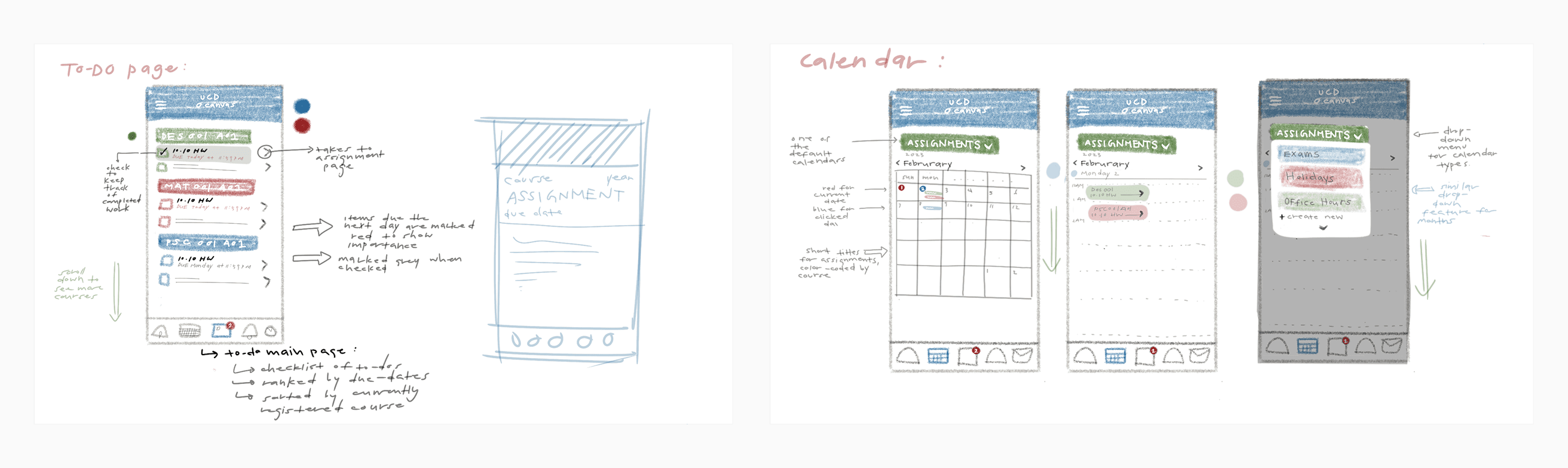
Instead of adding features, I restructured what already existed around the student’s mental model: course first, then time.
Rather than redesigning the task list itself, I explored how restructuring existing information around students’ mental models could make planning feel more intuitive.
The proposed solution grouped assignments into collapsible sections by course, allowing students to focus on the classes most relevant to them while reducing visual clutter. By aligning the interface with how students already organize their workload, the design made it easier to navigate tasks without adding complexity.
CHALLENGE
Successfully blending new designs into an existing design system.
An important constraint throughout this project was designing within Canvas's established design system. As a widely adopted platform, Canvas already has recognizable interaction patterns and visual conventions that existing users understand. Rather than redesigning the product from scratch, our goal was to improve one specific workflow while preserving the familiarity of the overall experience.
Throughout critiques, we used a simple design principle: every new interaction should feel like a natural extension of an existing Canvas pattern. If a solution introduced unnecessary complexity or required users to learn entirely new behaviors, it was removed. Working within Canvas’s established design system, we leveraged existing elements across the platform while also introducing a new task management structure, to create an improved yet cohesive and familiar experience for users.
FINAL DESIGN
Adapting to support the ways students already organize their academic workload.
By reorganizing existing course information around students' mental models, the redesigned experience helps students:
See priorities at a glance through collapsible course-based sections instead of one continuous task list.
Reduce visual clutter by allowing completed or irrelevant tasks to be dismissed.
Plan more holistically by combining academic deadlines with personal schedule entries.
Build confidence in the platform by surfacing only the information that remains relevant.
DEMO

REFLECTION
Understanding effective design is not always about adding new features, but refining existing ones.
This project reshaped how I approach design within constraints and taught me the value of intentional simplicity. The most meaningful insight wasn't the collapsible sections or the ability to dismiss completed tasks. It was realizing that Canvas already had the information students needed; the challenge was how that information was organized.
By rethinking the structure of existing features rather than introducing entirely new ones, I learned how small design decisions can make an experience feel more intuitive. It reinforced a principle I carry into my work: good design isn't always about giving users more. It's about reducing the mental effort required to get things done.


READ MORE

